Introduction
In the era of rapid technological advancements, computers have become an integral part of our daily lives. From smartphones to powerful desktop machines, understanding the hardware components that make these devices tick is crucial for tech enthusiasts and everyday users alike. In this article, we will delve into the various hardware components that collectively form the powerhouse of your computer, including a crucial aspect often overlooked – device drivers.
Central Processing Unit (CPU): The Brain of the Operation
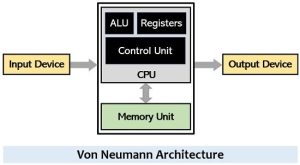
At the heart of every computer is the Central Processing Unit, or CPU. Think of it as the brain of your machine. The CPU executes instructions from your computer’s programs, performing calculations and managing data. Clock speed and the number of cores are essential factors to consider when evaluating a CPU’s performance. To ensure optimal functionality, it’s important to have the latest device drivers for your CPU, as these drivers play a vital role in optimizing performance and addressing compatibility issues.
Random Access Memory (RAM): The Short-Term Memory
Random Access Memory, or RAM, serves as your computer’s short-term memory. It stores data that is actively being used or processed by the CPU. The more RAM your computer has, the more efficiently it can handle multiple tasks simultaneously. Ensuring that your RAM has the appropriate drivers installed can enhance its stability and performance, allowing for seamless multitasking.
Storage Devices: Preserving Your Data
Storage devices are where your data is stored for the long term. Hard Disk Drives (HDDs) and Solid State Drives (SSDs) are the two primary types. HDDs use magnetic storage and are suitable for large-capacity, cost-effective storage, while SSDs, relying on flash memory, offer faster data access speeds and increased durability. Proper device drivers for these storage devices are crucial for optimal read and write speeds, as well as ensuring compatibility with your operating system.
Motherboard: The Nervous System
The motherboard is the central hub that connects all the components of your computer. It houses the CPU, RAM, and other critical hardware, facilitating communication between these parts. Expansion slots, USB ports, and connectors for peripherals are also found on the motherboard. Keeping the motherboard drivers up to date is essential for stability, performance, and compatibility with the latest hardware components.
Graphics Processing Unit (GPU): Bringing Visuals to Life
For users engaging in graphic-intensive tasks like gaming or video editing, a dedicated Graphics Processing Unit, or GPU, is essential. It accelerates rendering and processing of images and videos, enhancing the overall visual experience. Installing the latest GPU drivers ensures optimal performance, compatibility with software, and access to the latest features and optimizations.
Power Supply Unit (PSU): Fueling the Machine
The Power Supply Unit converts electrical power from an outlet into a form usable by your computer. It distributes power to the various components, ensuring they receive the right voltage and current. Wattage is a key consideration when choosing a PSU, depending on the power requirements of your system. While PSUs typically don’t require specific device drivers, it’s crucial to choose a reliable and compatible unit to avoid potential issues.
Cooling Systems: Keeping Temperatures in Check
As computers generate heat during operation, cooling systems, such as fans and heat sinks, are crucial to prevent overheating. Some high-performance systems also employ liquid cooling solutions for more effective heat dissipation. While the cooling components themselves may not require device drivers, some advanced cooling solutions may come with software that allows users to customize fan speeds and monitor temperatures.
Peripheral Devices: Enhancing Functionality
Peripheral devices, such as keyboards, mice, monitors, and printers, extend the functionality of your computer. They connect to the machine either through wired or wireless interfaces, providing input and output capabilities. Installing the appropriate device drivers for these peripherals ensures seamless integration with your system and unlocks additional features that enhance user experience.
Device Drivers: Ensuring Compatibility and Optimization
Device drivers act as intermediaries between the operating system and hardware components, facilitating communication and ensuring proper functionality. Regularly updating device drivers is crucial for maintaining compatibility with the latest software updates and optimizing the performance of your hardware. Whether it’s your CPU, GPU, storage devices, or peripherals, keeping drivers up to date contributes significantly to a smooth and efficient computing experience.
Conclusion
Understanding the hardware components of your computer empowers you to make informed decisions when upgrading or building a new system. As technology continues to evolve, staying informed about the latest advancements in hardware components and keeping device drivers up to date ensures that your computer remains a reliable and efficient tool in an ever-changing digital landscape. Whether you’re a casual user or a dedicated enthusiast, appreciating the inner workings of your machine and the importance of device drivers is key to unlocking its full potential.